Application Architecture
Overview
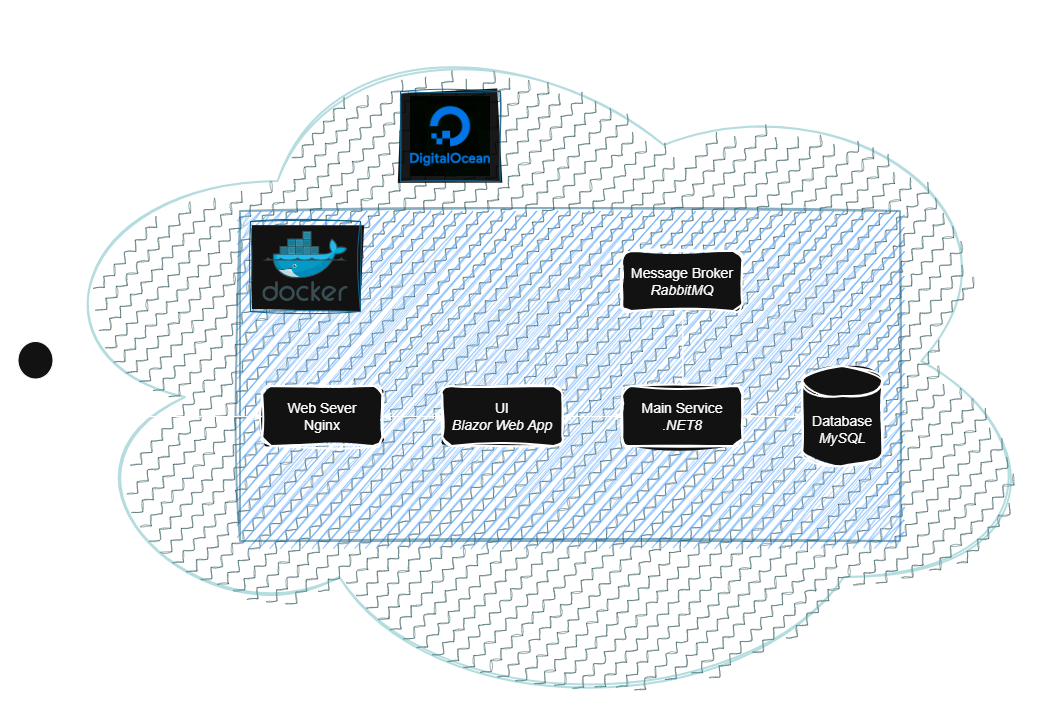
When I started designing this application, I wanted to build something relatively straightforward, reliable, and easy to work with during development and deployment to the cloud. I also wanted to use Docker on a bigger scale than in my previous projects. That led me to a containerised approach where each part of the system runs in its own Docker container and they are orchestrated by Docker Compose. Docker, with my application, runs on my server in the cloud (DigitalOcean) and the application is behind Nginx. If the app grows, I have room to expand and add new services, but for now, this setup supports everything I need while staying easy to manage. Here is a quick walk-through of the main parts of the architecture and how they fit together.
- Blazor Frontend: The user interface is built with Blazor, which gives me the benefits of a modern web UI while staying in the .NET ecosystem. It handles rendering UI and initial validation of fields. That means it doesn't need to call the backend service to check if the user, for example, typed the correct airport ICAO code while trying to generate a new schedule. Moreover, it communicates with .Net8 service, for example, to generate a new schedule. Once the new schedule is generated, it is displayed to the user as a list of flights and is also presented on the interactive map.
- .NET 8 Backend: This service is the core of this application. Firstly, it is used to communicate and get airport details from the 3rd party party API and generate flight routes that are later used for the main algorithm, which generates schedules. Secondly, it is responsible for handling communication between UI and Database, which might be getting airport details, so that a user can see suggested airports. It also acts as a publisher and consumer of messages through RabbitMQ. These messages are used to handle logs at the moment. To make this service and its functionality secure, endpoints need authorisation and there is rate-limiting.
- MySql Database: Keeps all the data needed for this application, such as airports or flight routes details.
- RabbitMQ: It is used for asynchronous work and background tasks. The backend service publishes messages when an operation doesn't need to be finished at this specific time. Once the right time comes, it can then consume and process these messages. This keeps the API responsive and allows less important operations to be processed at a later time without blocking anything.